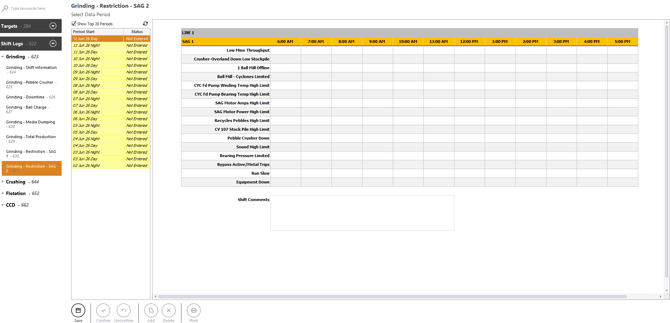
1. Login and Navigate to Grinding – Restriction-SAG2
- Login into Optimum and navigate to the Data Portal.
- Under Data Portal, click Shift Logs and expand the Grinding section.
- Click Grinding – Restriction-SAG2 to open the data entry form.
Under Select Data Period, choose the shift you want to enter.
Shift Status Types:
- Not Entered – No data saved
- Unconfirmed – Data saved but not confirmed
- Confirmed – Finalised and locked
3. Entering Restriction-SAG2 Data
Enter x as a valid input for each timestamp as required for the following
- Low Mine Throughput
- Crusher-Overland Down Low Stockpile
- 1 Ball Mill Offline
- Ball Mill - Cyclones Limited
- CYC Fd Pump Winding Temp High Limit
- CYC Fd Pump Bearing Temp High Limit
- SAG Motor Amps High Limit
- SAG Motor Power High Limit
- Recycles Pebbles High Limit
- CV 107 Stock Pile High Limit
- Pebble Crusher Down
- Sound High Limit
- Bearing Pressure Limited
- Bypass Active/Metal Trips
- Run Slow
- Equipment Down
Enter Shift Comments if there is any comment to be made for the shift regarding restriction for SAG 2
4. Save Entry
- Click Save at the bottom of the form to store the shift entry.
- Once saved, the shift becomes Unconfirmed.
- After saving, you may confirm the entry if you have the required access.
- Confirming locks the shift — no further changes can be made unless it is unconfirmed first.
- Click Unconfirm if you need to edit a confirmed entry (access‑dependent).
- Deletes the shift entry (only available to authorised users).