
Process
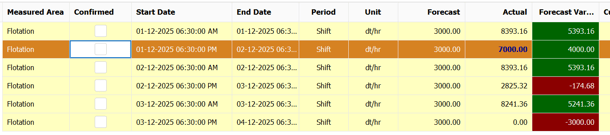
All production lines will appear highlighted yellow within the data grid.
This indicates that confirmation still needs to be done.
Step-by-Step Guide to Confirming a Production Record
There are two ways to confirm a production record.
- Right-click the event in the data grid and select Confirm.
-
Highlight the event and tick the check box to Confirm in grid under the column heading Confirmed.
Once confirmed, the event will change from yellow to white in the data grid and the Check Box under the column heading Confirmed will have a tick in it.

How to Un-confirm an Event
To un-confirm an event, use any of the same two methods listed above.
After un-confirming, the event will revert back to yellow and require confirmation again.